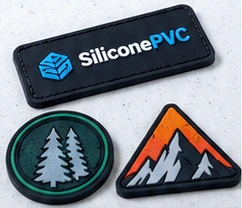
Turning a brand design into a custom silicone patch starts with more than sending a picture to a factory. A clear artwork file, target size, color references and intended attachment method all help the manufacturer assess the design and prepare a useful sample.
Silicone patches can be used on clothing, caps, bags and accessories. Their size, thickness, backing and attachment method depend on where and how they will be used. A screen mockup is a helpful starting point; the physical sample is what allows you to review the detail at its intended size.
Featured image: illustrative design concepts, not photographs of finished products.
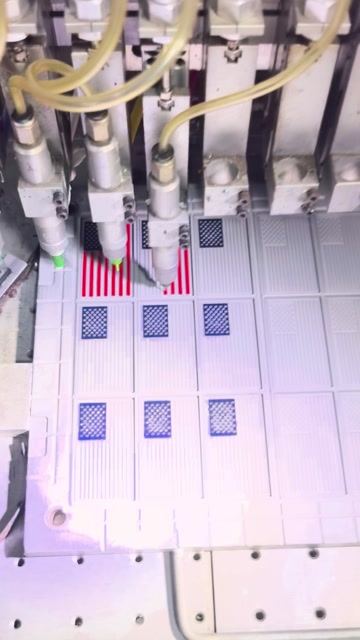
Watch: How a Silicone Patch Takes Shape
See color dispensing, mold cleaning, white silicone compound loading and the finished patch. The heat-press machine is shown in a reference photograph.
1. Start With Clear Silicone Patch Artwork
Where possible, provide an editable vector file such as AI, SVG or PDF. If you only have a JPG, PNG or a photo, it can still help start the discussion. Identify the colors, outlines and lettering that must be retained, and flag any parts you are willing to adjust.
- Share a clear, standalone design rather than a blurred screenshot when available.
- Discuss gradients, shadows and dense detail early; a mold will not necessarily reproduce a screen image exactly.
- If the design contains a brand, character or other protected element, confirm you have permission to manufacture and display it.
A useful question to ask: “At my target size, which parts of this design might need adjustment?”
2. Share the Size and Placement
Give the target width and height, and explain whether the measurements refer to the patch body, its outer edge or any attached hardware. For a cap, sleeve or small area of a bag, a photo of the placement, available space and expected quantity can help the supplier review the design.
The same logo may look clear at a larger size but lose readable lettering or separation between adjacent colors when reduced. Discuss thickness, edge finish and the desired feel for the intended use instead of relying on the digital artwork alone.
3. Provide a Reference for Each Color
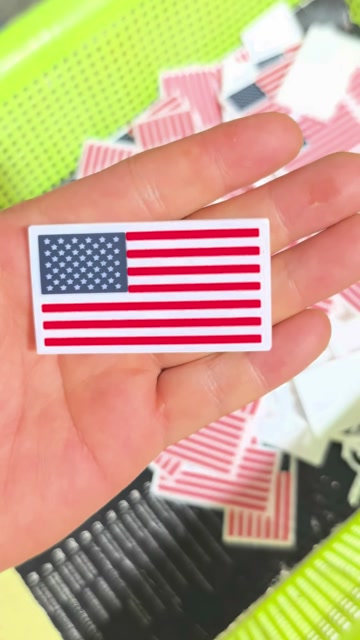
Label each color in the artwork and provide a Pantone reference, a physical sample or another clear reference where possible. Specify whether the background, logo and border colors need separate matching. For a white or light-colored base, check visible specks and color boundaries during sample review.
Screen settings, lighting and material can affect how a color appears. Agree on the acceptable range and the sample approval method with your supplier rather than assuming an exact match from a screen.
4. Review Small Text, Fine Lines and Raised Details
Look at the smallest lettering, lines, spacing, sharp corners and color areas at the intended physical size. If details are crowded, consider enlarging the design, simplifying lines, adding space or adjusting the text. What can be achieved depends on the artwork, material, mold and process.
Flat Artwork and Dimensional Effects
If you want raised, recessed or layered areas, mark the desired levels and discuss which parts can be made with height differences. A mockup is a communication aid; confirm the final contour and feel with a physical sample.
For an example of color dispensing, cleaning and molding, see how a white-base silicone patch is made.
5. Explain the Backing and Attachment
Will the patch be sewn onto clothing, attached to a bag or combined with another component? Share the base material, expected environment and preferred attachment method. Sewing, adhesive and other structures need to be assessed against the actual substrate and intended use.
If you need wash resistance, bond strength or another performance characteristic, discuss the requirements and test conditions in advance. An appearance photo does not establish performance; agree on appropriate testing or sample verification.
6. Use the Sample as an Approval Reference
Compare the physical sample with the artwork: check its size, color, readable details, edge, thickness and back. If it will be sewn or attached, try it on the actual substrate where practical. Mark requested changes on photos and confirm next steps with the supplier.
- Do the size and shape fit the intended position?
- Are the colors, fine lines and lettering acceptable?
- Is the backing and attachment method suitable?
- Which use or performance requirements still need testing?
See the silicone product sample approval checklist for more guidance.
Ready to Discuss Your Custom Silicone Patch?
Share your artwork or reference image, target dimensions, intended use, colors, estimated quantity and preferred attachment method. If you have not decided on every detail, we can discuss those during the project review.